
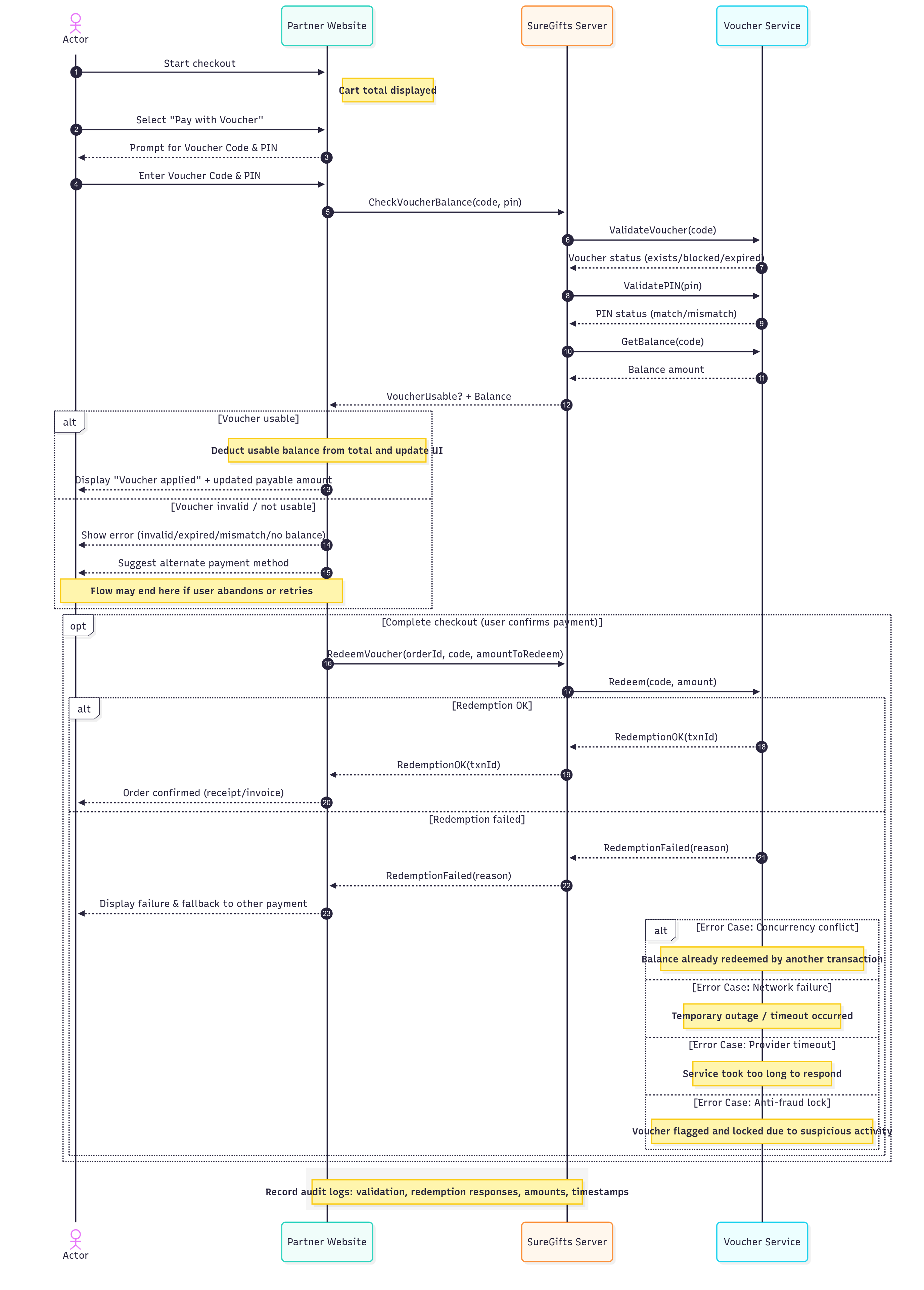
Actors & Components
- Customer – The person purchasing goods/services who owns a voucher.
- Partner Website – The online store or merchant where checkout takes place.
- SureGifts Server – A middleware system that communicates between the merchant and voucher issuers.
- Voucher Service – The system that issues, tracks, and manages voucher balances and validity.
Step-by-Step Flow
Voucher Redemption Flow Explanation (Detailed)Voucher Redemption Flow Explanation (Detailed)### 1. Checkout Initiation
- The Customer adds items to their cart on the Partner Website.
- During checkout, they select “Pay with Voucher” as a payment method.
- The website prompts them to enter their voucher code and PIN.
- Example: Customer has a voucher worth ₦5,000 and a cart total of ₦8,000.
2. Voucher Validation
-
The Partner Website sends the voucher details (code and PIN) to the SureGifts Server.
-
The SureGifts Server then communicates with the Voucher Service to:
- Validate the voucher code → checks if the code exists.
- Validate the PIN → checks if the PIN matches the voucher.
- Check balance → confirms the remaining value of the voucher.
-
The Voucher Service responds:
-
Voucher OK (usable) → valid code, correct PIN, and has sufficient balance.
-
Voucher Invalid (not usable) → possible reasons:
- Voucher expired.
- Voucher already fully redeemed.
- Incorrect voucher/PIN combination.
- Voucher blocked/suspended.
-
3. Decision Point – Usable or Not
-
If the Voucher is OK:
-
The Partner Website updates the checkout total.
- Example: ₦8,000 total – ₦5,000 voucher balance = ₦3,000 left to pay.
-
A confirmation message is shown to the customer (e.g., “₦5,000 voucher applied successfully”).
-
-
If the Voucher is Invalid:
- The customer sees an error message (e.g., “Invalid or expired voucher”).
- They can try another voucher or switch to a different payment method.
4. Completing Checkout
-
When the voucher is valid and balance is applied:
-
The Partner Website proceeds with finalizing the transaction.
-
It sends a Redeem Voucher request to the SureGifts Server.
-
The SureGifts Server forwards this request to the Voucher Service.
-
The Voucher Service executes redemption:
-
Redemption OK (Transaction Success) → balance is deducted, voucher is updated, and transaction is approved.
-
Redemption Failed (Transaction Unsuccessful) → reasons may include:
- Voucher balance was already used in parallel by another attempt.
- Network or service error.
- Voucher is locked due to suspicious activity.
-
-
5. Displaying Outcome
-
If Redemption Success:
- The Partner Website confirms the order.
- Customer receives payment confirmation and order summary.
-
If Redemption Failed:
- The website displays a failure message (e.g., “Voucher could not be redeemed. Please try again or choose another payment method”).
- The Customer can retry with another voucher or complete checkout with card/bank transfer.
Key Points & Considerations
-
Two-Stage Validation:
- Balance Check (pre-checkout) → ensures voucher is real and has value before showing deduction.
- Redemption (finalization) → ensures funds are truly deducted and prevents double usage.
-
Customer Experience:
- Clear messaging for success and failure avoids confusion.
- UI updates immediately when a voucher is applied.
- Seamless fallback to other payment methods improves conversion.
-
SureGifts Role:
- Acts as a neutral middleman between merchants and voucher providers.
- Protects merchants from fraud by validating vouchers before redemption.
- Ensures consistency and security in voucher processing.
-
Example End-to-End Scenario:
- Customer buys shoes worth ₦8,000.
- They apply a ₦5,000 SureGifts voucher.
- Voucher validation succeeds (balance available).
- Website deducts ₦5,000, leaving ₦3,000 to pay.
- Customer pays remaining ₦3,000 via card.
- Partner Website redeems voucher via SureGifts.
- Redemption succeeds → Order completed, confirmation displayed.