
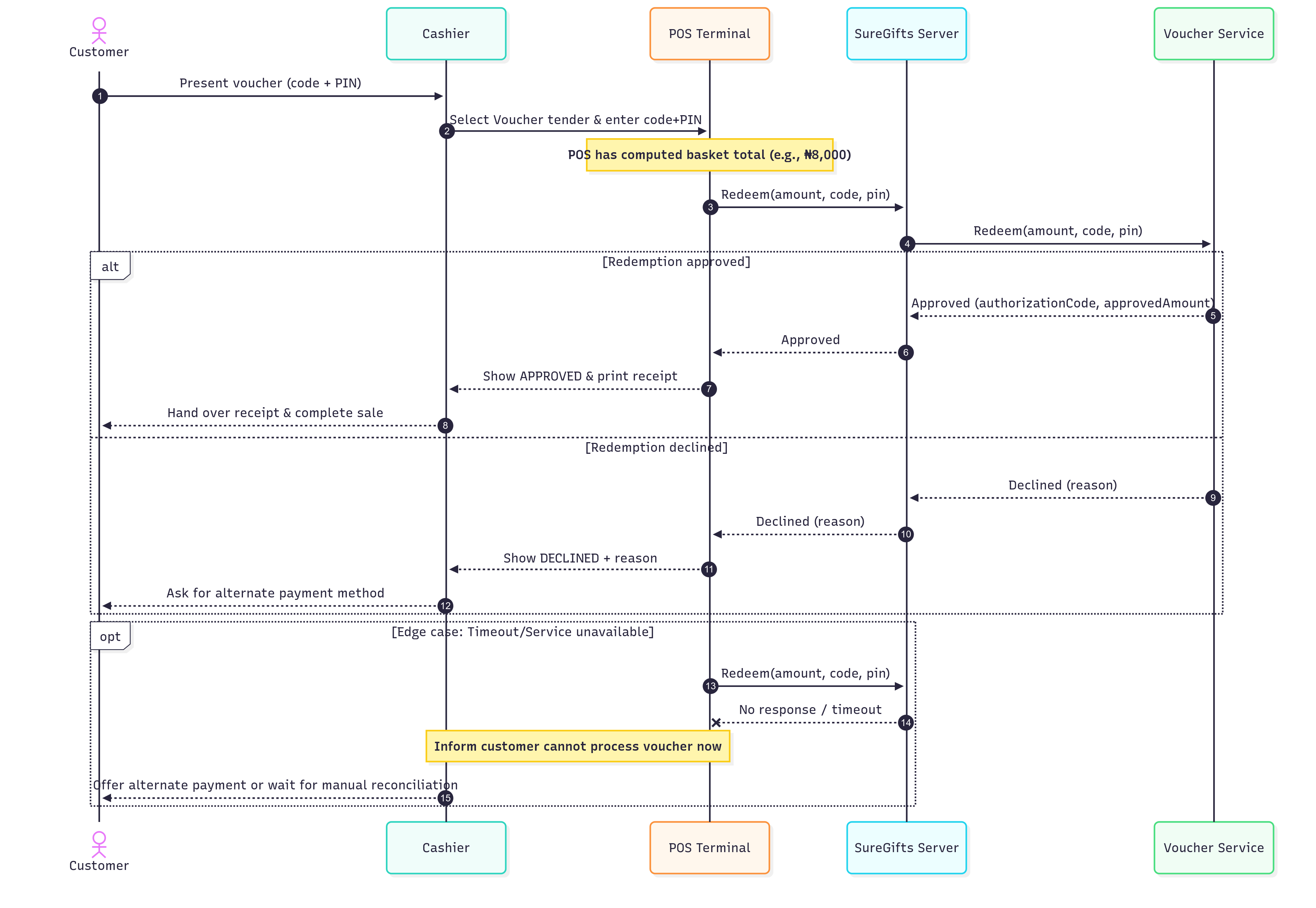
Actors & Components
- Customer – Holds a voucher (code + PIN) and is paying at the till.
- Cashier – Operates the POS.
- POS Terminal – The device/app used to capture payment.
- SureGifts Server – Middleware that processes voucher redemptions.
- Voucher Service – System of record for voucher validity and balance.
High-Level Idea
At POS, there is no pre-check/balance inquiry. The POS attempts to redeem the voucher for the exact purchase amount. The response tells us if the redemption succeeded or failed.
Step-by-Step Flow
1. Start Sale
- Cashier scans items → POS computes total (e.g., ₦8,000).
- Customer selects Voucher as payment method.
2. Capture Voucher
- POS prompts for Voucher Code and PIN (typed or scanned).
- POS includes the transaction amount in the request.
3. Redeem (Single Call)
-
POS → SureGifts Server → Voucher Service with payload:
voucherCode,pinamount(e.g., 8000)
4. Voucher Service Decision
-
Success → Voucher is valid and covers the requested amount. It immediately deducts the value and returns Redemption OK with:
authorizationCodeapprovedAmount
-
Failure → Returns Redemption Failed with a reason code
5. POS Handling & Customer Messaging
-
If Success:
- POS marks voucher tender as approved.
- Prints receipt including
authorizationCode, last 4 digits of voucher, date/time, and amount. - Transaction is completed.
-
If Failure:
- POS displays specific error message.
- Cashier requests an alternate payment method (card/cash/another voucher).
6. Edge Case – Timeout/Unavailable
-
If the POS request times out or SureGifts is unavailable:
- The transaction is not confirmed.
- Cashier informs customer the voucher could not be processed at this time.
- Customer pays using another method or waits for manual reconciliation later.